

On this page
Web
Modern Impressions Website
Five years as webmaster for a Charlotte office-technology dealer, building onto a bought theme: a live Net Promoter Score dashboard wired to a third-party API, a branching support triage flow, and a knowledge base I wrote most of.
Modern Impressions sells and services office technology across the Carolinas. I was hired as an IT support technician in 2018, picked up webmaster duties along the way, and kept them until I left in March 2023 — which in a company that size means you are the web team, the person who fixes the printer, and the one who gets asked why the contact form went quiet.
The theme was not mine
Worth saying plainly, because a portfolio makes it easy to imply otherwise. The
theme was bought by the company, they hired a design firm to make it — style.css still credits Triad Web Design
Service — the original version from them can actually be viewed for comparison v1.0.
My job was never really to redesign it, it was to keep it running and make it do things it couldn’t. Everything below is work built onto that base.
That constraint shaped most of what follows. I kept it updated and running but kept my additions modular, so features were deployed as theme parts and template overrides that a future maintainer could find, and the settings behind them had to live somewhere a non-developer could find and change them as needed. Nobody was going to edit PHP after I left.
The theme had major problems early on
Early on there were major performance issues with the theme. Among others, I removed a declared jQuery string from the footer, which was causing javascript errors, then updated BootStrap to the current version at the time, and removed the built-in, outdated, version of Font Awesome to use a kit from the CDN.
Most notably, I also had to upgrade the built-in version of OptionTree, which was already outdated by several years when it would’ve been included in the theme. This work can be seen in the commit history, and references this OptionTree fork of the theme’s repository.
Putting a real number on the homepage
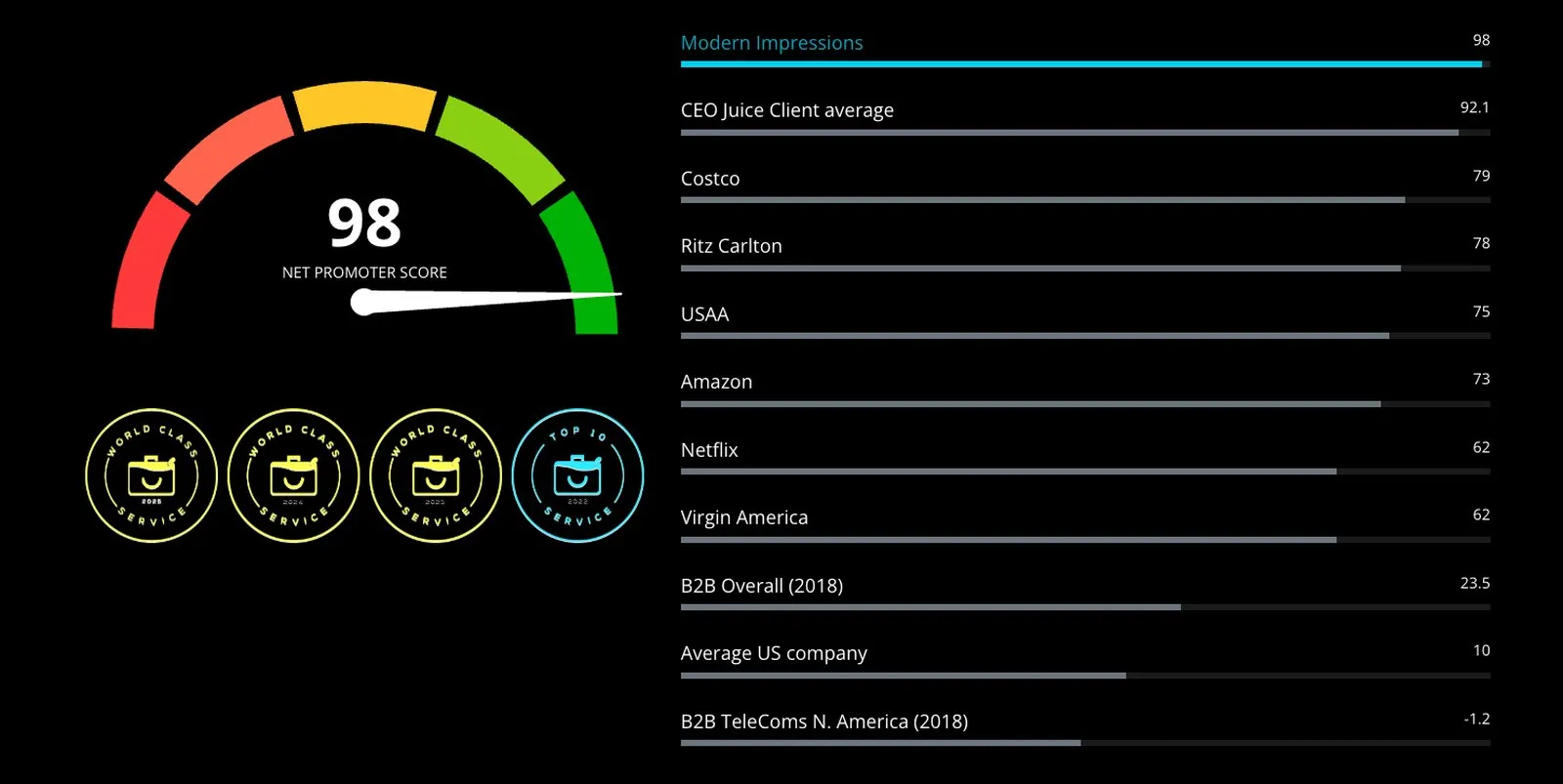
Modern Impressions subscribes to CEO Juice, which automates post-service survey follow-up for copier dealers and scores the results. Management wanted the score on the homepage.
The easy version is a number in the page content that somebody remembers to update. There was no reality where that was going to be manually maintained, so the section pulls live.
Reading the API
A theme part calls the CEO Juice NPS endpoint for the company’s record. What
comes back isn’t one score — it’s the dealer alongside a set of benchmark
companies, each flagged with a referenceData boolean. The part walks the
response, sorts our own row out from the reference rows, and renders the two
differently: our score drives the gauge, the references become a ranked ladder
underneath it.
A second call pulls the awards widget as HTML rather than data, which meant stripping the stylesheet link it arrives with so it couldn’t fight the theme’s own CSS. Not elegant. It was the difference between shipping the awards and not.
A companion part hits the survey-comments endpoint for testimonials. The one piece of real judgement there is a length filter: comments over 320 characters get dropped before rendering, because a customer who writes three paragraphs breaks the carousel and there is no amount of CSS that makes an essay work in a rotating quote box. The part requests a few extra comments beyond what’s configured, so filtering doesn’t leave the carousel short.
The gauge
The score renders as a half-circle meter with a needle, and the benchmarks as
native <progress> elements — the semantics were already right, so the work was
styling rather than building. Credentials and the comment count live in theme
options, so the numbers can be changed without touching code, and each section
has an off switch for when the API is having a bad day. An outage should cost you
a section, not the homepage.
Getting people to the right place
The support page’s problem wasn’t information, it was navigation. Everything a customer needed was already on the site, arranged the way people who already knew where things were had arranged it.
So the page opens with a question — how can we help you today? — and five answers: technical issue, account change, order supplies, submit a meter reading, pay an invoice. Each branches, and each branch ends at the specific page that resolves it. It’s a Vue Flow Form questionnaire, and its entire purpose is to get someone to the right destination in two clicks rather than making them parse a navigation menu.
Below it sits a “Most Helpful Articles” list built from a WP_Query ordered on
the helpful-vote meta key. The list ranks itself from what readers actually found
useful, which is a better editor than I am and never forgets to update.
The knowledge base
I wrote the templates and most of the articles. The templates override BasePress to add a table of contents, breadcrumbs, previous/next article navigation, and a metadata strip driven by custom fields: difficulty, which printer brand the article covers, and which platform the reader is on.
That last pair matters more than it sounds. A driver install guide is different for Lanier and Kyocera, and different again on macOS versus a Chromebook. Without those fields you either write one article hedged into uselessness or you write eight and let the reader guess. With them, a reader lands on an article that is already narrowed to their machine and their computer.
Two of the troubleshooting articles I wrote for Modern Impressions were later published on Experts Exchange, where each has drawn more than 40,000 views:
- F248 Service Code Errors — Kyocera Printers
- SC899-00 Service Code Errors — RICOH / LANIER / SAVIN Printers
They also sit alongside my community activity and awards on my Experts Exchange profile.
Taking payments without touching a card
The payment page collects an invoice number and an amount, then hands off.
It requests a hosted-payment-page token from the Authorize.Net API server-side and posts that token to Authorize.Net’s own form, so the customer enters their card on Authorize.Net’s page, not ours. Card details never reach the server, and the compliance surface of the whole feature is one API credential in the settings. For a company whose web presence is maintained by one person who also has a service queue, that is the only responsible shape for this feature.
One business rule ended up encoded in a length check: an eight-digit invoice number isn’t a service invoice at all, it’s a lease, and leases are billed by a separate company entirely. Enter one and the page stops, explains it, and links to the leasing portal rather than taking a payment that would have to be refunded later.
The rest of it
A product catalog over WooCommerce templates, a staff directory split by department, a remote-support download page, and a number of forms and widgets.
What’s still standing
Most of it. As of today the homepage still shows the gauge — 98 — above the benchmark ladder, the testimonial carousel is still turning over live survey comments, and knowledge base articles still carry the metadata strip and the previous/next navigation.
It isn’t running my exact code any more. The benchmark list now includes the CEO Juice client average, which my version explicitly filtered out, and testimonials have grown star ratings my markup never emitted. Somebody has been in there since, which is how it should be — the measure of a handover isn’t that nothing changed, it’s that changing it was possible even if it has meant that the new maintainer has removed any credit to me. The repository is the theme as it stood when I handed it over in March 2023.
Screens from the live site
The homepage section in context — gauge, benchmark ladder and the testimonial carousel below it, all rendered from the same API. Customer names and comments blurred.
The support page opens with a question instead of a menu.
Each answer branches to the page that resolves it, rather than to a list of pages that might.
A knowledge base article. The metadata strip narrows it to a Lanier machine on macOS; the contents list and previous/next navigation are template overrides.
The payment page collects an invoice number and an amount. Everything after that happens on Authorize.Net.